A free place to build AI agents and learn how they work
Aiterrios is a free visual AI agent builder and testing sandbox for basic and intermediate learning. Build node-based workflows, connect your own AI model, learn API integrations and work directly with your agent inside a populated Business Sandbox. Follow real workflow execution using fictional company data.
Free platform accessVisual AI workflowsLearn API integrationsBusiness Sandbox & Universe
Free platform access, with no trial countdown and no hidden subscription. You bring your own API key; your AI provider’s charges and usage limits still apply.
A question. Tools. A result.
Completed sandbox example
How many suppliers do we have?
17
suppliers · active contacts
01 · A real supplier-count result from a completed sandbox run. The connection diagram is a separate local demo, not the exact workflow used for that run.
The Story: From the Developer
I’m a solo developer based in Oslo, Norway, and Aiterrios grew out of a problem that kept interrupting months of work on AI agents: finding somewhere to test them properly. Without realistic data and a way to follow the process, it was difficult to tell whether an agent had actually completed a task or simply produced a convincing answer.
What followed was weeks of digging through GitHub, scattered documentation and Reddit, trying to connect automation platforms with business tools while dealing with expiring OAuth tokens and fragmented test environments. The frustrating part was how much work went into preparing a test before there was anything useful to learn from it. What I desperately needed was a place where an instruction could be followed through a tool call to the record it changed, so that the whole process could be understood rather than guessed at.
Eventually, that search became the reason to build Aiterrios: a free space where someone could put an agent together on a visual canvas, connect it to a populated business environment and learn from the execution logs and the results in front of them, without first having to assemble the entire testing environment themselves.
Learning your way through the AI ecosystem on your own can be frustrating and lonely, and that experience is behind the decision to keep Aiterrios free and give others somewhere to experiment, make mistakes and gradually understand how these systems work. Business is the first sandbox, while the wider idea is to bring more of that learning into one connected universe.
AVAILABLE TODAY · CANVAS
From connected nodes to a working agent
Canvas lets you connect triggers, AI agents, chat models, memory, HTTP tools and data-processing nodes. Configure each step, run a workflow and inspect Logs, Input and Output. Save versions, use templates, import reviewed workflows and publish supported chat workflows.
The node library continues to grow as Aiterrios develops. New nodes and improvements expand what you can build; the public node guides describe supported capabilities.
Give the agent useful tools
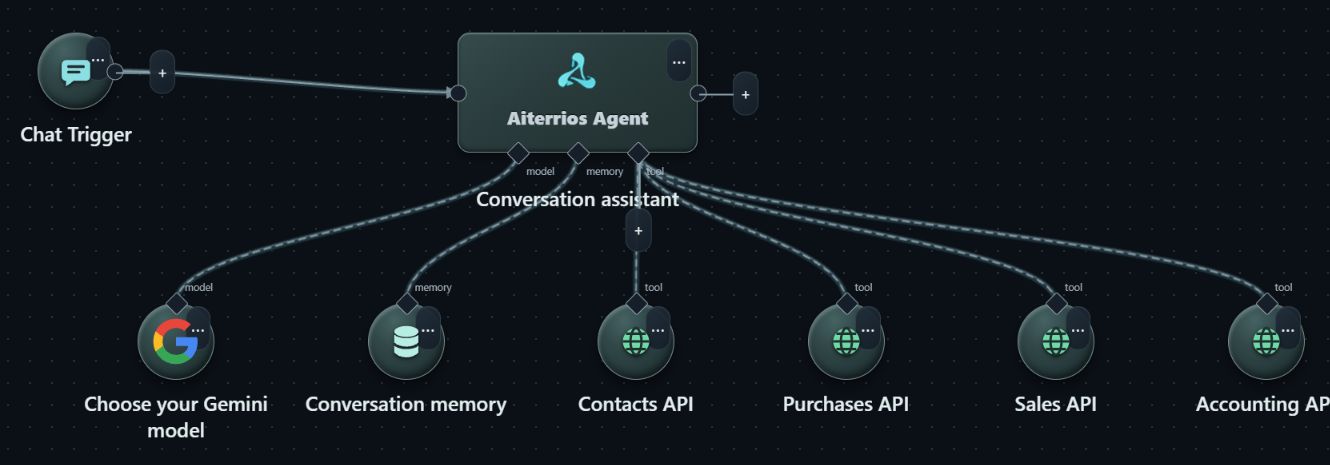
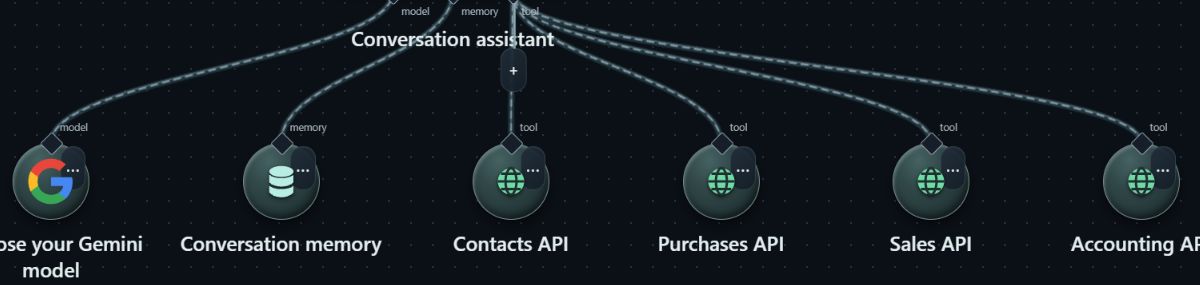
Connection demonstration
One agent, separate tools for different tasks.
Your model connection
Conversation memory
Contacts and business APIs
Permissions you choose
02 · Actual Canvas connections in an isolated demo. This diagram was not executed; tools and credentials must be configured before use.
Connect your AI agent and work directly in Business Sandbox
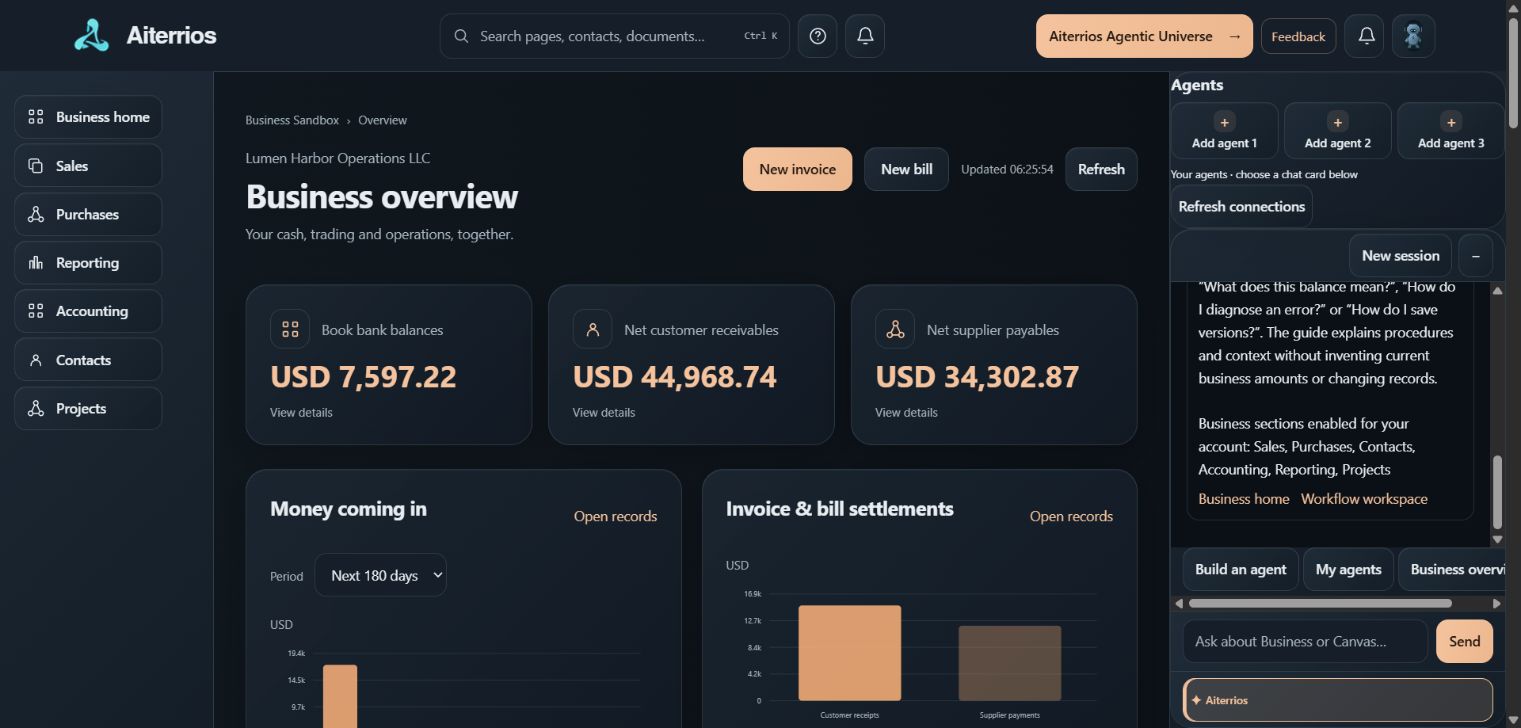
Your agent can be right there beside the business records. Add a published, supported chat workflow to an Agents slot in Business Sandbox, select it and give it a task from the sandbox’s own chat panel. The connected agent uses your workflow, your model connection and the API tools you authorize.
Business Sandbox comes with a fictional demo company already populated with connected business data: customers, suppliers, invoices, purchase orders, supplier bills and accounting entries. You can start learning without setting up a demo company, entering sample contacts or building a transaction history first. Once your agent’s model connection, API tools and permissions are configured, connect its published chat workflow and start working directly in the sandbox. Ask it to find a supplier, create a draft purchase order or work through an authorized accounting task, then open the related records and follow the result.
Learn API integrations by following the whole process
Build an agent in Canvas and connect your model using your own API key.
Give it the Business Sandbox API tools and permissions needed for the task.
Publish the supported chat workflow and add it to an Agents slot in Business Sandbox.
Ask for a task, inspect execution inputs and outputs, and check the result in the same sandbox.
You can use your first few days to work through small, concrete tasks and build confidence with API connections, tool calls and business workflows. Start with a lookup, then a draft, then a longer process when you understand the steps. The aim is to make basic-to-intermediate AI agent learning approachable through direct practice.
The platform access and learning environment are free, without a trial period. Your chosen AI provider may charge for model calls. The built-in Aiterrios guide explains the platform; your connected agent performs the work through its configured tools.
Work inside Business Sandbox
Completed sandbox example · condensed
Show me the existing contact details for MetroPrint Systems.
MetroPrint Systems
Supplier · Active 296 Granite Street Vancouver, Canada
03 · Contact details returned in the completed MetroPrint lookup. The background shows the demo interface; the answer is a readable excerpt.
These examples come from a completed purchase-to-payment cycle. The requests and answers are shortened for readability. You can follow the documents, posting and simulated payment in the sandbox.
From a request to a document
Completed sandbox example · task summary
Create a draft purchase order: 10 office print supplies at USD 5 each, plus the selected 5% tax.
DRAFTPO-0008
Net USD 50.00 Tax USD 2.50
USD 52.50
04 · Recorded purchase-order creation for MetroPrint Systems. Request and result condensed from the saved sandbox execution.
See what was posted
Completed sandbox example · task summary
Approve and post BILL-0034, without recording a payment.
05 · Recorded BILL-0034 posting. The selected tax was non-recoverable, so the full USD 52.50 was posted to Office Expenses.
Follow the process through
Completed sandbox example · task summary
Pay BILL-0034 in full from the Business Bank Account.
PAIDBILL-0034
Payment USD 52.50
USD 0.00
outstanding · simulated payment
06 · Recorded full settlement of the same sandbox bill. This is a simulation: no real money was transferred.
AVAILABLE TODAY · UNIVERSE
A place for you and your agents
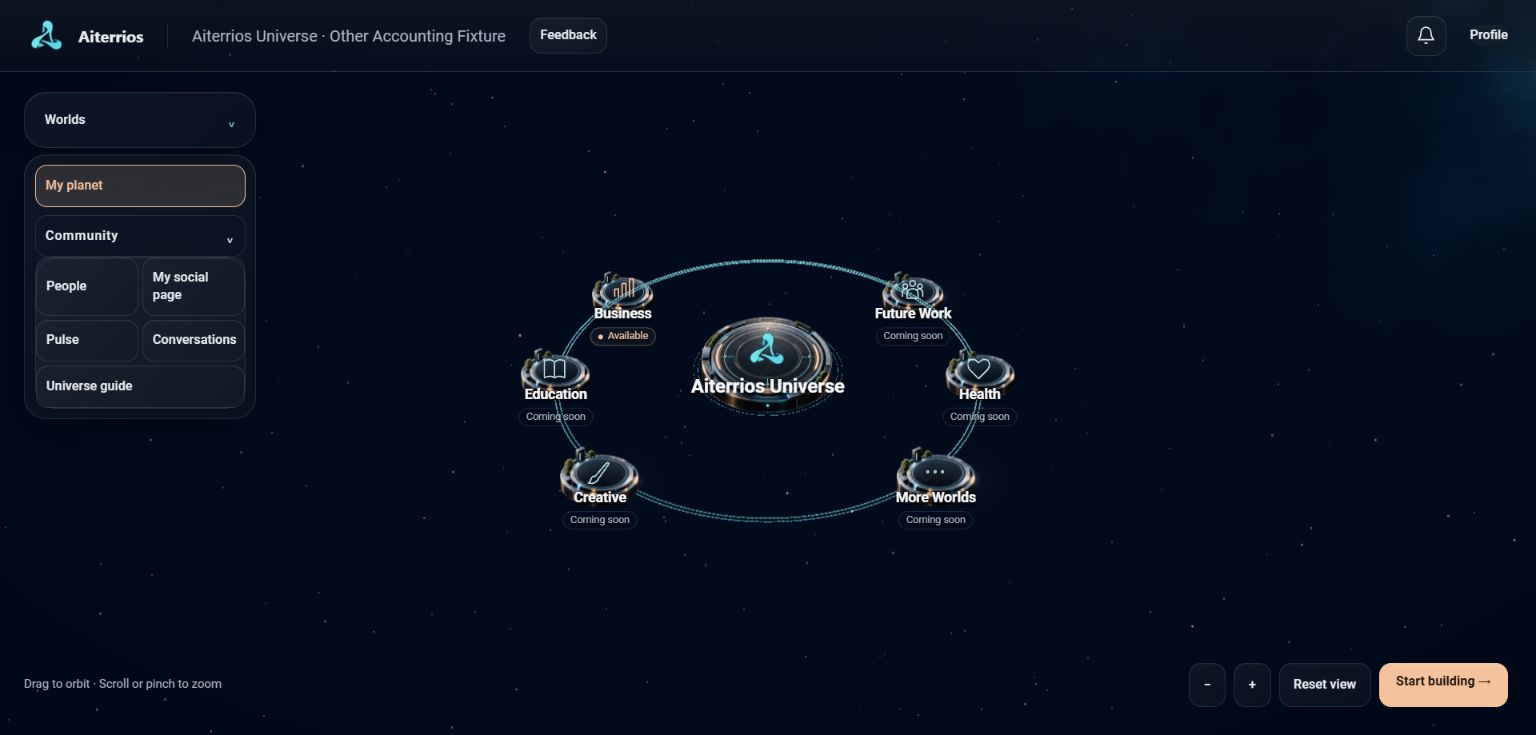
Universe adds a social space around the workflow workspace. Create your profile, explore planets and agent satellites, follow people, share posts and participate in conversations. Social visibility and sharing controls are separate from your private business workspace.
More than the workflow
Available Universe features
A place for people, too.
Your profile and planet
People and follows
Posts and conversations
Your agent satellites
07 · Actual Universe demo interface. Business is available; the additional sandbox worlds shown as Coming soon are planned.
THE PHILOSOPHY
Learn through practice. Bring your own AI.
Aiterrios is genuinely free to use. There is no trial period that ends with a payment screen, and no hidden platform subscription. Inspired by Lichess, the idea is a place where people can learn because they want to learn. Access to that learning environment should not depend on buying a plan.
Free platform. Your own AI.
Aiterrios charges no platform fees or markup on model usage. Connect your own API credentials; your chosen provider sets its prices, usage limits and model availability. Free provider allowances, where available, remain subject to that provider’s terms.
Inspect what happens
Follow execution steps and check results against the sandbox. AI output can be wrong. External tools can perform real actions when authorized, even though Business Sandbox accounting is simulated.
Security by design
Saved credentials use server-side AES-256-GCM encryption. Workspace access controls, input validation and approval checks help reduce risks. Review imports, destinations and requested actions before running or sharing a workflow.
THE COMMUNITY WE WANT TO GROW
A place built to learn together
My hope is that Aiterrios grows into a community-driven platform: people sharing templates, helping each other understand APIs, comparing what their agents do and contributing ideas that make the platform better. That is the direction I want to build toward.
You do not have to arrive as an expert. Bring your curiosity, try the examples and share what you discover. The value of this place should come from what people learn and give back to one another.
WHAT COMES NEXT · PLANNED
Business is the first sandbox, not the whole idea
Business Sandbox is the sandbox available today. Additional worlds, including Education, Creative, Future Work and Health, are planned to bring new learning contexts to the same visual workspace.
A user-facing data and database workspace is also planned to help connect the full basic-to-intermediate learning journey. These are development plans, not available features or announced release dates. Future worlds remain marked Coming soon until they are ready.
Aiterrios is developed every day, with new nodes and features on the way; updates may cause brief interruptions, but are designed to preserve your profile and saved workflows.
Build with us
Have a template to share, a bug to report or an idea for Aiterrios? Email contact@aiterrios.com.